Who can use this
- Sales managers, team leads, founders, and revenue leaders reviewing rep activity and pipeline.
- RevOps owners and admins configuring the reports, rubrics, dashboards, fields, and access managers rely on.
- Operators helping managers troubleshoot missing meetings, hidden reports, or incomplete team visibility.
Before you start
- Confirm the manager has reporting access and meeting visibility for the team or users they need to review.
- Make sure reps have completed email/calendar and meeting-capture setup before using reports as an adoption or performance signal.
- Ask RevOps or an admin to configure the dashboards, reporting fields, call-grading rubrics, CRM fields, stages, and views that match the way your team coaches and runs pipeline reviews.
- Tell reps how AI summaries, grades, and health signals will be used. Treat them as coaching and inspection signals, not as automatic performance judgments.
Tips
- Pick the manager workflow before opening dashboards. Decide whether you are reviewing call coaching, notetaker adoption, pipeline risk, follow-up hygiene, handoffs, or forecast confidence.
- Start with source coverage. If meetings are not captured, reps are not onboarded, or access is missing, reporting and call grading will be incomplete.
- Use call grading to make coaching specific. Review rubric results on the meeting detail page alongside the transcript, summary, action items, and source moments. Coach the behavior you can point to.
- Calibrate rubrics with RevOps. If scores feel too broad or every rep looks the same, tighten the criteria, meeting-title scope, rubric fields, or dashboard filters.
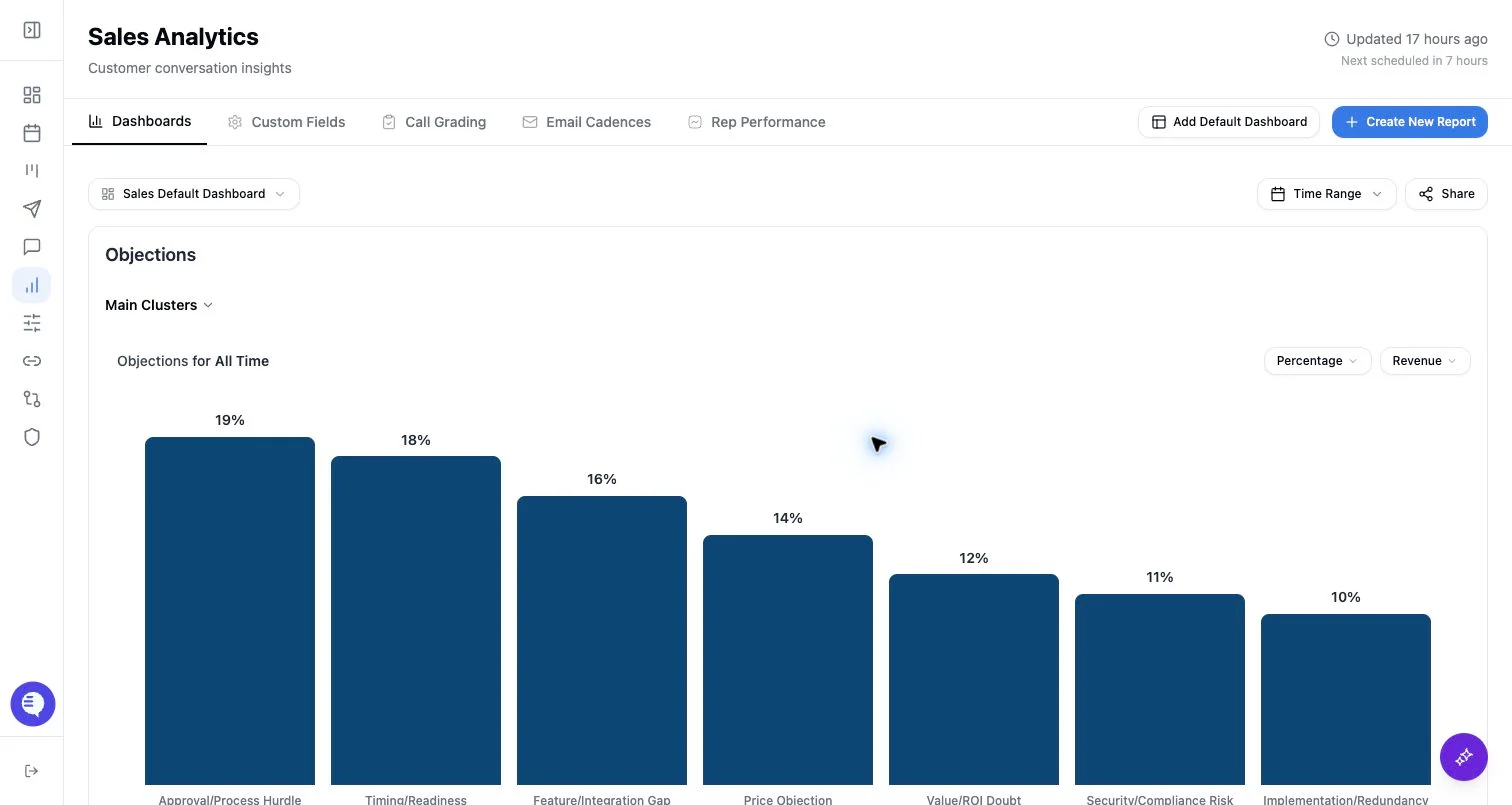
- Look for team patterns before picking a coaching theme. Use Reporting and Chart Builder to compare fields or rubric categories by rep, team, date range, stage, meeting type, or outcome when those views are configured.
- Use deal health, priority, activity, and saved views as an inspection queue. A low score, missing next step, stale activity, or weak buyer engagement should trigger review with the rep, not automatically change the forecast.
- Prepare for 1:1s from evidence. Open a few recent calls or deals before the meeting, bring the exact moments or fields you want to discuss, and agree on one behavior or pipeline action to improve.
- Ask Ergo specific manager questions when AI/search is available. Name the team, rep, pipeline, date range, meeting type, deal stage, or field you want reviewed.
- Close the loop with RevOps. If the manager workflow does not match the dashboards or fields, change the configuration instead of asking managers to work around stale reporting.
What to expect
- Reporting access controls which dashboards and reporting tools a manager can see. Admins and team admins can have broader access; other users may need explicit reporting grants.
- Call grading, reporting mentions, transcripts, summaries, action items, drafts, and deal-health signals can finish or update separately.
- Deals, Ergo View, reporting tabs, call grading, email cadences, and rep-performance surfaces can be gated by role, feature access, team setup, and reporting permissions.
- AI grades, health, priority, and reporting fields are directional. Use them to decide where to inspect, then confirm with meeting, CRM, email, and rep context.
Common issues
- The manager cannot see rep calls because user onboarding, team membership, meeting visibility, reporting access, or source permissions are incomplete.
- A dashboard looks empty because filters, date ranges, selected dashboards, saved views, or source fields exclude the expected data.
- The team reviews aggregate grading before enough captured meetings exist for a useful pattern.
- The rubric is too broad, so grades look similar across reps or do not map to the coaching behavior the manager cares about.
- A forecast or pipeline review overweights one score instead of combining CRM stage, close date, buyer engagement, recent meetings, next-step clarity, rep follow-up, and source evidence.
- Notetaker adoption is treated as a rep issue before the team has aligned on which meetings should be captured and how the bot should be admitted.
Related articles
- AE tips for success
- CSM tips for success
- Reporting overview
- Call grading rubrics
- Chart builder
- Notetaker adoption dashboard: reading edge cases
- Deals board overview
- Custom views and Ergo View
- Deal and account health
- Meeting detail page
- Video, transcript, and action items
- Reviewing AI-generated outputs
- Spectator and viewer tips for success
- Roles and permissions